How to Audit Your Website for Generative Engine Optimization
Learn how to audit your website for Generative Engine Optimization (GEO). Discover practical steps to improve website content, technical SEO, entity information, brand authority, and visibility in AI-generated search results.
Introduction
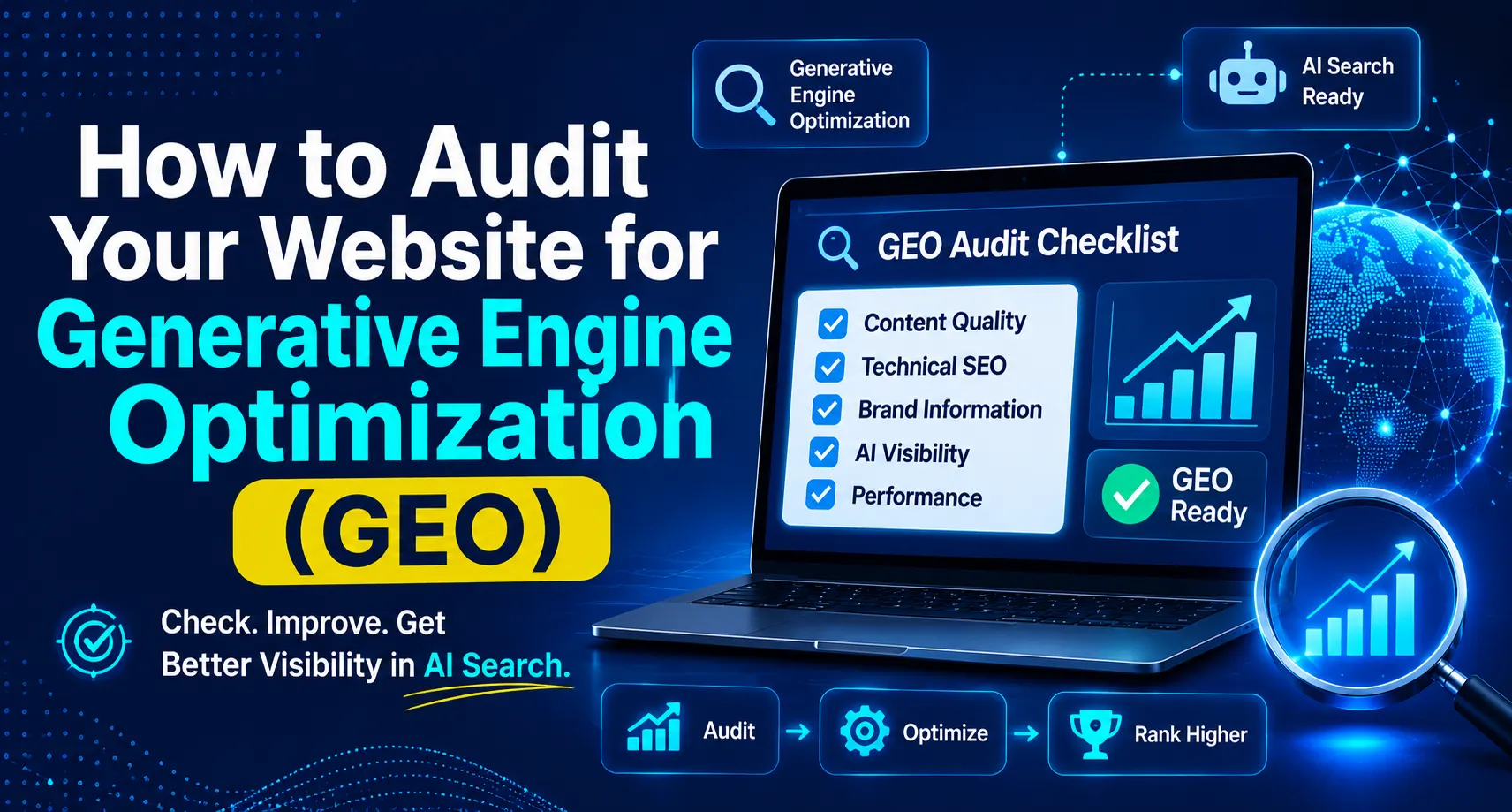
A GEO Audit Checklist helps businesses evaluate whether their website is properly optimized for Generative Engine Optimization (GEO). It helps identify issues in website content, technical SEO, brand information, and AI search visibility.
The way people search for information online is changing. Earlier, most users visited search engines like Google, searched for keywords, and opened different websites to find answers. Today, people are also using AI-powered platforms such as ChatGPT, Google Gemini, and Microsoft Copilot to ask questions and discover information about businesses, products, and services.
This change has made Generative Engine Optimization (GEO) an important topic for website owners and digital marketers. GEO focuses on improving how clearly your website and business information can be understood, discovered, and potentially referenced in AI-generated answers.
A GEO Audit helps businesses identify website issues that may affect their visibility in AI-powered search experiences.
In this guide, you will learn how to audit your website for Generative Engine Optimization, which important areas to check, what common mistakes to avoid, and how to create a practical improvement plan for better search visibility.
Table of Contents
What Is a GEO Website Audit?
Why Is a GEO Audit Important for Your Website?
How Does Generative Engine Optimization Work?
How to Audit Your Website for Generative Engine Optimization
How to Check Whether AI Search Engines Can Access Your Website
How to Audit Website Content for GEO
How to Check Your Website's Entity and Brand Information
How to Audit Technical SEO and Website Structure
9. How to Measure AI Search Visibility and Website Performance
10. Common GEO Audit Mistakes to Avoid
11. Step-by-Step GEO Website Audit Checklist
12. Practical Example: Auditing a Business Website for GEO
13. Frequently Asked Questions (FAQs)
14. Conclusion
15. About the Author
Key takeaways
Understand GEO Audits: Learn how a website audit helps identify improvements needed for AI-powered search visibility.
Check AI Accessibility: Review whether important website pages can be crawled and accessed by relevant search systems.
Improve Content Quality: Publish useful, accurate, original, and well-organized content.
Review Brand Information: Make sure your business name, services, and important details are consistent online.
Check Technical SEO: Review indexing, mobile usability, page experience, internal links, and structured data.
Track Performance: Monitor search visibility, website traffic, brand mentions, and relevant AI citations where measurable.
What Is a GEO Website Audit?
A GEO website audit is a process of checking a website to find problems that may affect its visibility in AI-generated answers. It checks website content, technical SEO, brand information, and other important factors to help AI understand the website better.
A GEO audit also includes checking traditional SEO elements because search engines and AI-powered search experiences rely on important foundations such as crawling, indexing, useful content, and website quality.
A GEO Website Audit checks different parts of a website, including content quality, technical structure, brand information, and AI search visibility.
For example, imagine you own a digital marketing agency. Your website explains your SEO, social media marketing, and web development services, but the information is unclear or spread across poorly organized pages. A GEO audit can help identify these problems and suggest ways to improve your website structure and content.
Why Is a GEO Audit Important for Your Website?
A website may have useful information but still face problems with accessibility, content organization, or brand clarity. A GEO audit helps identify these issues before you start making improvements.
Here are some important reasons to audit your website:
Improve Content Clarity: A GEO audit helps identify pages that contain unclear explanations, outdated information, or incomplete answers.
Check Website Accessibility: It helps you understand whether search crawlers can access your important website pages.
Improve Brand Understanding: Accurate business details and clear service descriptions help communicate what your company offers.
Identify Technical Problems: You can find issues related to indexing, website structure, broken links, and mobile usability.
Find Content Opportunities: Reviewing customer questions can help you discover topics that deserve better explanations.
Monitor Online Visibility: You can create a starting point for tracking brand mentions, citations, and relevant website traffic.
How Does Generative Engine Optimization Work?
Generative Engine Optimization focuses on improving the quality, clarity, and discoverability of website information so that AI-powered search systems can better understand and potentially reference it.
When someone asks a question through an AI-powered search platform, the system may use available information from different sources to prepare a response. The sources and methods can vary depending on the platform and the user's question.
Some important areas of GEO include:
Helpful and original website content.
Clear headings and organized page structure.
Accurate business and entity information.
Crawlable and indexable website pages.
Relevant internal and external references.
Good website experience and mobile usability.
Consistent brand information across relevant platforms.
Google's official guidance also explains that traditional SEO best practices remain important for its generative AI search features. There is no special trick that guarantees inclusion in AI-generated answers.
How to Audit Your Website for Generative Engine Optimization
A proper GEO audit should cover different parts of your website rather than focusing only on keywords. Start by reviewing the website's current condition and then identify areas that need improvement.
1. Review Your Website's Main Pages
Start by checking important pages such as your homepage, About Us page, service pages, contact page, and blog articles.
Make sure every page explains its purpose clearly. Visitors should be able to understand what your business offers, who it serves, and how they can contact you.
2. Check Your Website Content
Review whether your pages provide useful answers to questions your target audience may ask. Remove outdated information, improve unclear explanations, and add practical examples where necessary.
3. Review Business Information
Check your business name, services, address, contact details, and company description. Make sure the information is accurate and consistent wherever your business is represented.
4. Check Technical SEO
Review crawling, indexing, broken links, page speed, mobile usability, and website navigation. These factors help make your website easier to access and use.
5. Review Your Website's Online Presence
Check relevant business profiles, industry directories, publications, and other sources that mention your company. Look for incorrect details and outdated descriptions.
6. Prepare an Improvement Plan
After completing the audit, create a list of issues based on their importance. Fix critical accessibility and indexing problems first, followed by content improvements and other optimization tasks.
Example: If your service pages are not indexed, start by investigating the indexing issue instead of spending time adding more keywords to those pages.
How to Check Whether AI Search Engines Can Access Your Website
Website accessibility is an important part of a GEO audit. If relevant crawlers cannot access your website pages, it may affect their ability to discover and process your information.
Start by checking your website's robots.txt file. This file provides instructions to crawlers about which website sections they can or cannot access.
You should also review these areas:
Robots.txt: Check whether important pages or website sections are accidentally blocked.
Noindex Tags: Make sure important pages do not have unwanted noindex instructions.
HTTP Status Codes: Check that important pages return the correct response, such as HTTP 200.
XML Sitemap: Make sure your sitemap includes important, canonical website URLs.
Firewall and CDN Settings: Check whether security systems are unintentionally blocking relevant crawlers.
Internal Links: Make sure important pages can be discovered through normal website navigation.
Expert tip
Ask your website developer to review robots.txt, crawler access, and server settings. Do not change technical settings without understanding their impact on your website.
How to Audit Website Content for GEO
Content quality is one of the most important areas to review during a GEO website audit. Your website should provide accurate, useful, and original information that answers real questions. An AI Search Content Audit checks whether your website content provides clear answers, useful examples, accurate information, and relevant details for users.
Start by checking whether your pages explain topics clearly and provide enough detail for visitors to understand them.
Use the following content audit points:
1. Check Content Relevance
Make sure every page matches the needs of your target audience. A service page should explain the service, its benefits, and who may need it.
2. Improve Heading Structure
Use clear H1, H2, and H3 headings to organize information. Headings should describe the content that follows and help readers navigate the page.
3. Add Direct Answers to Important Questions
Identify common questions related to your products, services, and industry. Provide clear answers instead of making readers search through several paragraphs.
4. Include Practical Examples
Examples help readers understand how a service or concept works in real situations. Add relevant examples, case studies, or practical explanations wherever possible.
5. Review Accuracy and Freshness
Update outdated statistics, old service details, broken references, and incorrect information. Make sure your content is fact-checked before publishing.
6. Add Original Insights
Avoid simply rewriting information available on other websites. Include your own experience, useful observations, expert explanations, or original examples.
Example: Instead of writing only "SEO improves website visibility," explain how keyword research, technical improvements, and helpful content can support a business's search presence.
How to Check Your Website's Entity and Brand Information
A Website Entity Audit helps check whether your business name, services, location, and other important details are clearly explained and consistent across your website.
During a GEO audit, review how clearly your website communicates your business identity. Search systems should be able to understand your brand name, what your company does, and which services it provides.
Here are some important things to check:
Business Name: Use your correct and consistent business name across important website pages.
About Us Page: Explain your company's background, expertise, and main services.
Service Information: Describe each service separately with clear and accurate details.
Contact Information: Make sure your contact details are updated and easy to find.
Author Information: Where relevant, provide accurate author details and professional experience.
Business Profiles: Review your Google Business Profile and relevant industry profiles for consistency.
Brand Mentions: Check how your company is described on relevant external websites.
Expert tip
Prepare one accurate business description and use it consistently across your website and relevant business profiles. Update it whenever your services or company details change.
How to Audit Technical SEO and Website Structure
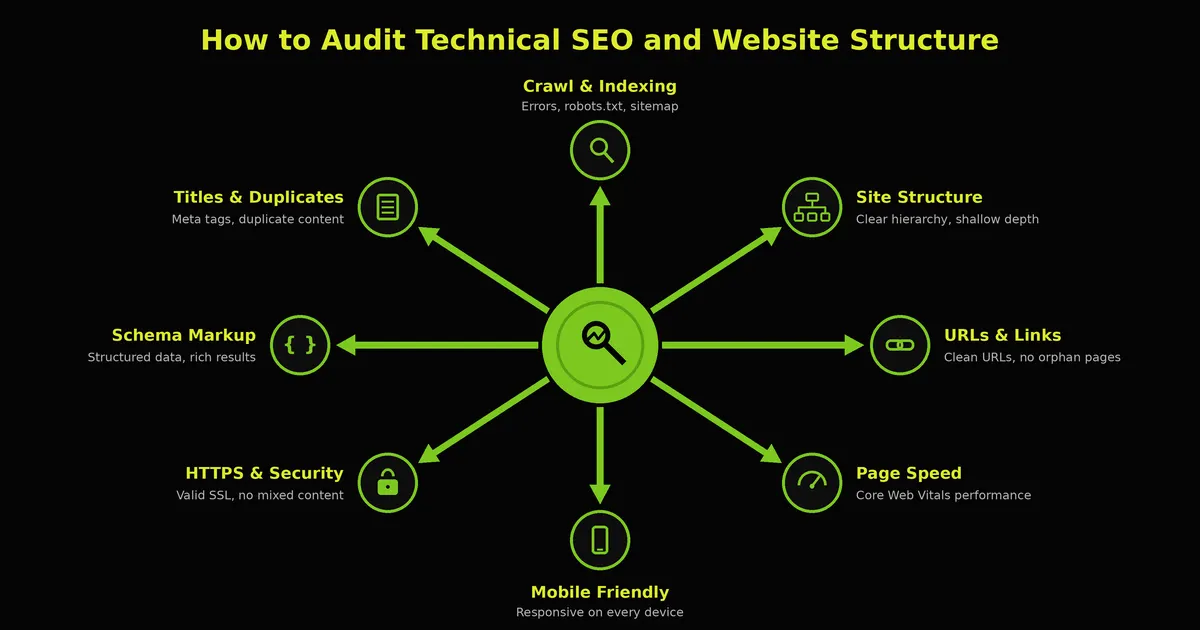
Technical SEO helps search systems discover, crawl, and understand your website. It also supports a better experience for visitors. A Structured Data Audit for AI helps identify whether your website uses relevant structured data correctly so search engines can better understand your page information.
A GEO audit should include the following technical checks:
Technical Area | What to Check | Why It Matters |
|---|---|---|
Website Indexing | Check important pages in Google Search Console | Helps identify indexing problems |
Robots.txt | Review crawler access rules | Helps prevent accidental blocking |
XML Sitemap | Check important and canonical URLs | Supports URL discovery |
Mobile Usability | Test pages on mobile devices | Improves the visitor experience |
Page Speed | Review loading performance | Helps users access content comfortably |
Broken Links | Find and fix incorrect URLs | Improves navigation |
HTTPS | Check website security | Protects website connections |
Canonical Tags | Review duplicate or similar URLs | Helps identify preferred page versions |
You can use tools such as Google Search Console and PageSpeed Insights to review several of these areas. You can use Google Search Console to monitor website indexing, identify technical issues, and review your website's search performance.
How to Measure AI Search Visibility and Website Performance
After completing your GEO audit, create a baseline to understand your website's current performance. This will help you compare results after making improvements. A Brand Visibility Audit helps you understand how often your business is mentioned or referenced across relevant online sources and AI search experiences.
You can monitor several indicators:
Performance Indicator | What to Monitor |
|---|---|
AI Brand Mentions | Whether your brand appears in selected AI-generated answers |
AI Citations | Whether AI responses reference your website |
Organic Traffic | Visitors coming from traditional search results |
AI Referral Traffic | Visitors arriving from AI platforms, where measurable |
Branded Searches | Searches containing your business name |
Indexed Pages | Important website pages included in search indexes |
Content Performance | Traffic and engagement on important pages |
Website Engagement | How visitors interact with your website |
Example: You may test questions such as "Which digital marketing agencies offer SEO services in Jaipur?" or "What should a business check before hiring a GEO agency?" Record brand mentions and website citations without assuming that one test represents overall visibility.
Common GEO Audit Mistakes to Avoid
A website audit is useful only when it identifies real problems and leads to meaningful improvements. Avoid these common mistakes:
1. Focusing Only on Keywords
Adding keywords to every paragraph does not automatically improve GEO. Focus on useful content that answers visitors' questions naturally.
2. Ignoring Technical SEO
Good content cannot help visitors if important pages are inaccessible or difficult to navigate. Check crawling, indexing, and website structure.
3. Publishing Duplicate Content
Copying or lightly rewriting content from other websites does not provide much value. Add original explanations, examples, and useful insights.
4. Ignoring Brand Information
Incorrect business details and inconsistent service descriptions can make your online identity unclear. Keep important information accurate.
5. Adding Unnecessary Schema
Do not add structured data just because it is described as a GEO technique. Use relevant schema and ensure it matches the visible page content.
6. Expecting Guaranteed AI Citations
No audit or optimization technique can guarantee that your website will appear in every AI-generated answer. Focus on improving accessibility, content quality, and trust.
7. Not Checking Results After Changes
Making changes without reviewing their impact can make it difficult to understand what is working. Keep records of completed improvements and monitor performance.
Step-by-Step GEO Website Audit Checklist
Use a GEO Audit Checklist to review important areas such as website content, technical SEO, structured data, brand information, and AI search visibility.
Use this checklist to review your website and organize your improvement work.
Step 1: Review Important Website Pages
Check your homepage.
Review About Us and Contact pages.
Check important service pages.
Review existing blog articles.
Identify outdated or incomplete information.
Step 2: Check Website Accessibility
Review robots.txt.
Check unwanted noindex instructions.
Verify important page indexing.
Review the XML sitemap.
Check relevant crawler access.
Step 3: Audit Content Quality
Use clear headings.
Answer relevant audience questions.
Add useful examples.
Check facts and outdated information.
Improve unclear or incomplete explanations.
Avoid duplicate and unnecessary content.
Step 4: Review Brand and Entity Information
Check your business name.
Review service descriptions.
Update contact information.
Check relevant business profiles.
Review author information where relevant.
Step 5: Check Technical SEO
Review mobile usability.
Check page loading performance.
Fix broken links.
Review canonical tags.
Check HTTPS and website security.
Validate relevant structured data.
Step 6: Review Links and Performance
Add relevant internal links.
Review useful external references.
Check Google Search Console.
Review Google Analytics 4.
Test relevant questions on AI platforms.
Record your starting performance.
Practical Example: Auditing a Business Website for GEO
Imagine a digital marketing agency wants to improve its online visibility through AI-powered search. The company has a website with service pages, blog articles, and contact information.
During its GEO website audit, the team identifies the following problems:
Audit Area | Problem Found | Recommended Improvement |
|---|---|---|
Content | Service descriptions are unclear | Rewrite them with useful explanations |
Technical SEO | Important pages are not indexed | Investigate indexing and crawling issues |
Brand Information | Business details are inconsistent | Update important business profiles |
Internal Links | Blog posts have few relevant links | Connect related articles and service pages |
Structured Data | Organization information is incomplete | Review and correct relevant schema |
Performance | Mobile pages load slowly | Improve page performance |
After identifying these issues, the company prepares an improvement plan. It first fixes important technical problems, then improves service pages, updates business information, and adds relevant internal links.
Frequently Asked Questions (FAQs)
1. What is a GEO website audit?
A GEO website audit reviews your website's content, technical structure, and business information. It helps identify improvements that may support discovery through AI-powered search platforms.
2. Why is a GEO audit important?
A GEO audit helps find problems related to content quality, website accessibility, indexing, and brand information. Fixing these issues can support better website discovery and user experience.
3. How often should I audit my website for GEO?
You can perform a detailed audit every few months and review important website changes regularly. Run another check whenever you publish major content or make technical updates.
4. Which tools can I use for a GEO website audit?
You can use Google Search Console, Google Analytics 4, PageSpeed Insights, Rich Results Test, and Schema.org Validator. You can also manually test relevant questions on AI-powered platforms.
5. How do I check whether AI crawlers can access my website?
Review your robots.txt file, server settings, and security rules to check whether relevant crawlers are blocked. For ChatGPT search discovery, review the access rules for OAI-SearchBot.
6. Can a GEO audit improve AI search visibility?
A GEO audit can identify issues and opportunities related to content, technical SEO, and brand information. Fixing them may support better discovery, but AI visibility and citations cannot be guaranteed.
7. What is the difference between an SEO audit and a GEO audit?
An SEO audit mainly reviews website factors that affect traditional search visibility. A GEO audit also examines how clearly website content and brand information may be understood and referenced in AI-powered search experiences.
8. Is GEO useful for small businesses?
Yes, small businesses can use GEO practices to improve their website content, business information, and online presence. They can begin with simple improvements before investing in professional services.
Conclusion
Auditing your website for Generative Engine Optimization is a useful way to understand whether your online presence is ready for changing search behaviour. It helps you review content quality, technical SEO, website accessibility, brand information, structured data, and overall website performance.
Start by identifying the most important problems instead of trying to change everything at once. Improve your website with accurate information, helpful content, clear navigation, and strong technical foundations.
Remember that GEO is not about finding shortcuts to appear in AI-generated answers. It is about making your website useful, trustworthy, accessible, and easy to understand for both people and search systems.
About the Author
Arena Infosolution shares educational insights about digital marketing, SEO, Generative Engine Optimization(GEO), and modern online marketing practices. Our content helps beginners and businesses understand changing search technologies and learn practical strategies to improve their online presence.
Want this done for your business?
Get a free growth consultation
Tell us what you're working on and a senior strategist will map your next move.